ㅤ
In Finmap, the “invoices” section is not just bills to send to clients, it is a tool that helps you simultaneously issue invoices, record payments, and see the real picture of money in the business.
ㅤ
What invoices do for your business:
- Issuing invoices for payment to your customers
- Automation – a paid invoice itself creates a cash flow in analytics.
- Debt control – you clearly see who owes you and how much.
- VAT under control – the system itself calculates the tax and shows how much you need to pay.
ㅤ
How to create an invoice
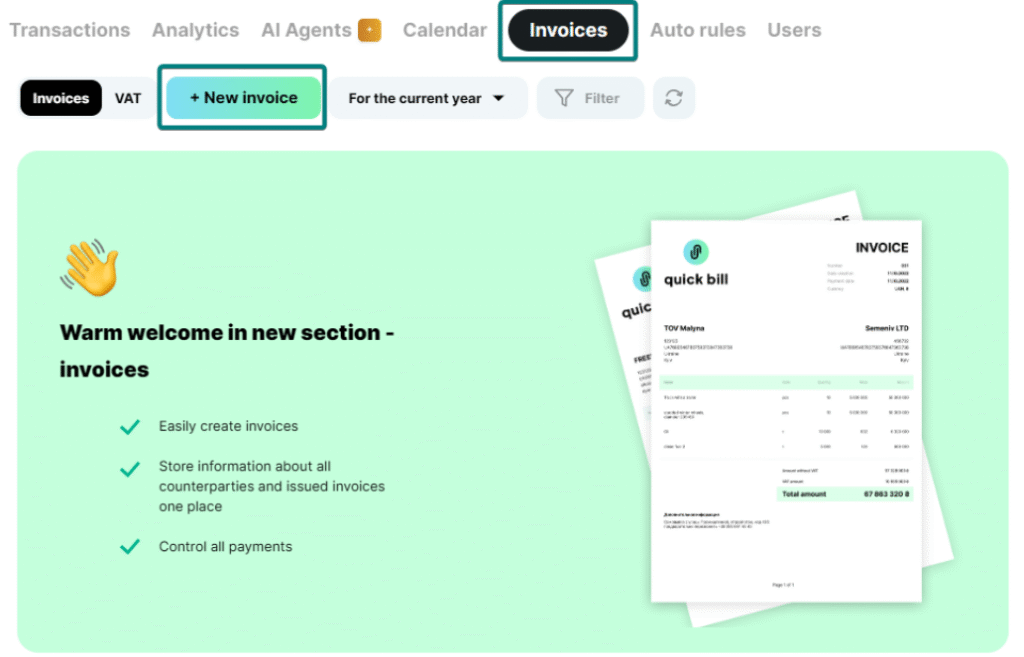
- Go to the “Invoices” section
- Click “+New Invoice”
ㅤ
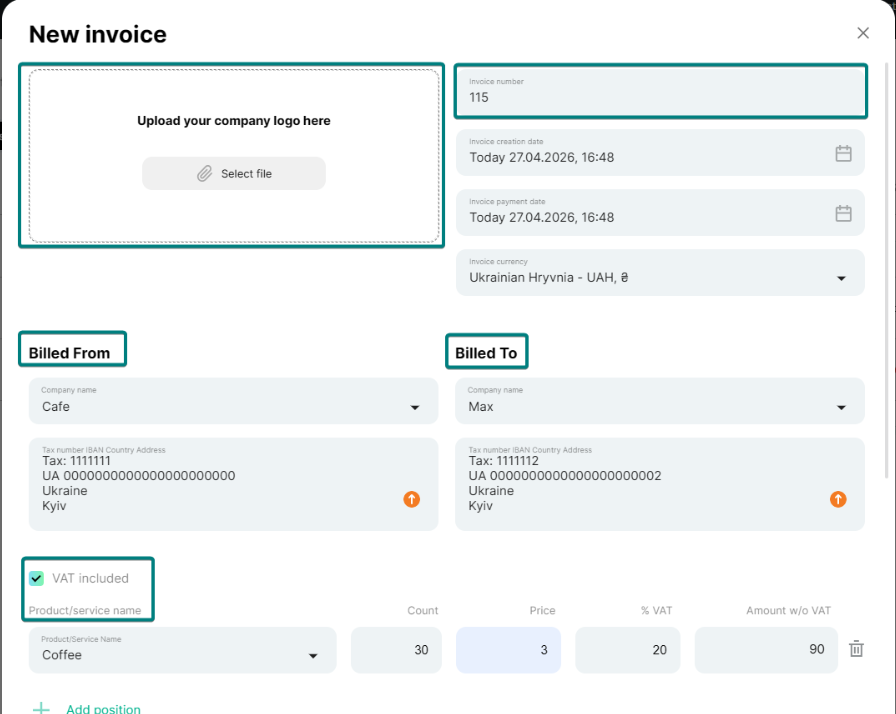
3. Fill in the details (customer, amount, payment date, etc.)
4. Click “Save” or “Save and Send”
ㅤ
After creating the invoice, we record the payment:
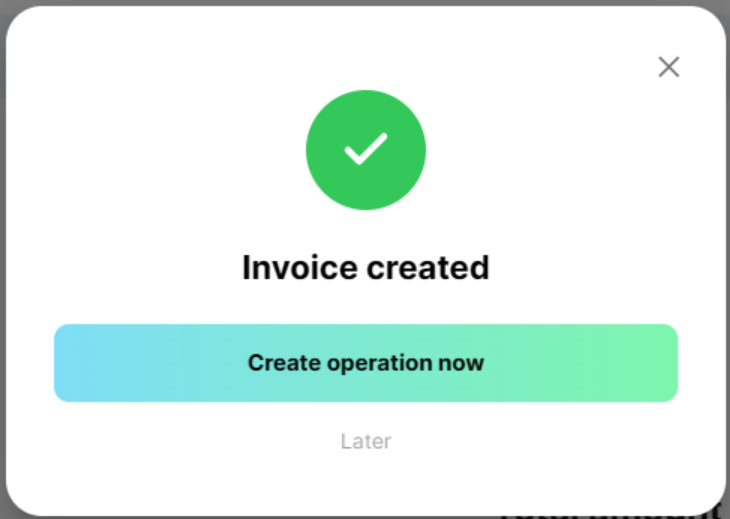
Option 1: Pay now. Select the account to which the money was transferred and that’s it! The invoice will receive the status “Paid”, and the amount will automatically appear in your Cash Flow.
Option 2: Pay later. You can simply save the invoice. It will receive the status “Not paid”. As soon as the client sends the funds, you can link this payment to the invoice in one click.
ㅤ
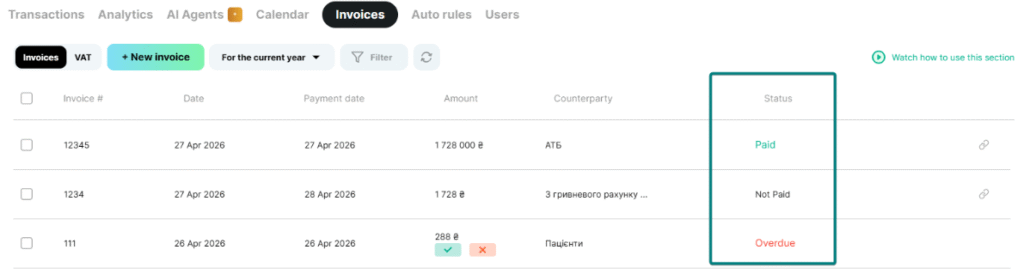
💡 Tip: If the scheduled payment date has passed and the money has not yet arrived, Finmap will automatically mark the invoice as “Overdue.” You will definitely not forget to remind the client about the debt.
ㅤ
ㅤ
Working with VAT
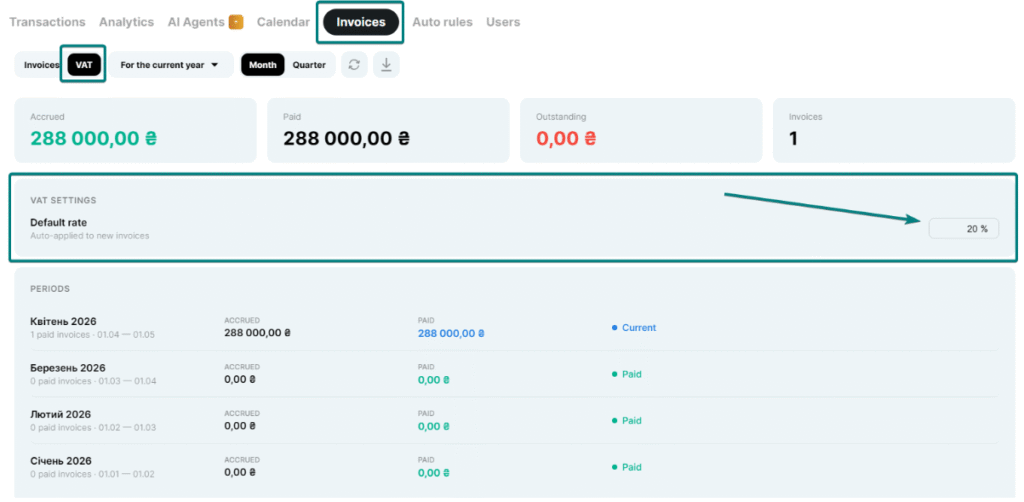
VAT calculation in the service is as automated as possible. In the settings, you just need to enable VAT and specify its rate (for example, 20%) — after that it is automatically added to all new invoices. As soon as the invoice is paid and a payment is linked to it, the system automatically takes into account VAT and displays this category in the analytics.
*Only the owner or a user with full access have access to VAT settings
ㅤ
ㅤ
Important to know
- invoices automatically enter analytics after payment
- one invoice — one payment linked to it
- the payment amount must match the invoice amount
- attaching and unattaching an invoice to a transaction is displayed in the “Action History”
- the payment currency must match the invoice currency
- the transaction date will correspond to the actual payment date, after the invoice is linked
ㅤ
📌Once an invoice is linked to a payment, editing is restricted. If you need to make changes, simply unlink the payment, edit the invoice, and re-record the payment.
ㅤ
Frequently asked questions
Why can’t I change the amount on the invoice?
If a payment is already attached to the invoice, the amount is blocked. This is a protection against discrepancies between the document and the actual movement of money.
How to change: unlink the payment → edit the amount in the invoice → record the new payment.
Why is the invoice marked as “Overdue”?
This happens automatically if the payment date has already passed and the money has not yet been recorded in the system. This status does not block anything, but only reminds you of the receivable.
How to remove: record the payment or change the “Payment Date” in the invoice itself to a future date.
The client did not pay the full amount – what should I do?
Currently, Finmap has the following rule: 1 invoice = 1 payment for the full amount. If the client has paid part:
Leave the invoice in the Not paid status and track the balance manually.
Or (recommended) split the order into two separate invoices: one for the amount already received, and the second for the balance.
Is it possible to issue invoices in dollars if the main currency is another?
Yes, you can choose any currency when creating.
Important: The account you are accepting payment to must be in the same currency as the invoice. If the invoice is in USD, the payment must also come to your USD account in the system.
I deleted a payment – why did the invoice become “Unpaid” again?
This is the correct logic of the system. If you delete a payment from the journal, the connection is broken and the invoice automatically returns to the status “Unpaid” or “Overdue”. Money and documents are always synchronized.
Where to set up VAT?
Only the owner or a user with full access can do this.
Go to the appropriate tab in the Invoices section and specify the required rate.
Can I edit an invoice after it has been created if it has not yet been paid?
Yes, while the invoice has the status “Unpaid”, you can change its data (amount, customer, payment date, etc.).
After the payment is linked, editing is restricted.
Can I send an invoice to a client directly from Finmap?
Yes, after creating the invoice, select the “Save and Send” option.
The system will generate an invoice and send it to the client to the specified email address.
Is it possible to duplicate an invoice so as not to create it from scratch?
Yes, you can copy an already created invoice and use it as a template.
This is convenient for recurring services or regular customers.
Is it possible to add multiple items (goods/services) to one invoice?
Yes, an invoice can contain several lines with different goods or services.
The system will automatically sum the total amount.
Do invoices affect analytics if they haven’t been paid yet?
No, only paid invoices are included in financial analytics. Unpaid invoices are only displayed in the accounts receivable section.
Is it possible to change the customer in an invoice that has already been created?
Yes, but only if the invoice has not yet been paid and there is no payment attached to it.
ㅤ
💡 In short, invoices in Finmap are a way to keep both accounts and money under control without unnecessary actions and duplication.
ㅤ