Finmap AI is not just a chatbot. It is a team of highly specialized agents, each trained to perform a specific task: from instant profitability analysis to finding errors in thousands of transactions. They work 24/7, basing their answers solely on real-world data from your business.
ㅤㅤㅤ
1. AI agent team
Finmap AI has 5 specialized agents. Each has its own task:
| Financial Chat | Answers financial questions in chat. Analyzes Cash Flow, P&L, provides forecasts and highlights anomalies. |
| Check the report | Tells you what to look for in the reports |
| Check payments | Analyzes a specific account: finds duplicates, abnormal rates, suspicious transactions. |
| AI statement import | Recognizes statements from any bank in any format using AI. |
| Get PDF Report | Generates ready-made PDF reports with analytics, conclusions and graphs. |
ㅤㅤㅤ
Financial Chat✅
This is a CFO who is always on hand. You communicate with him like a regular person, asking complex business questions.
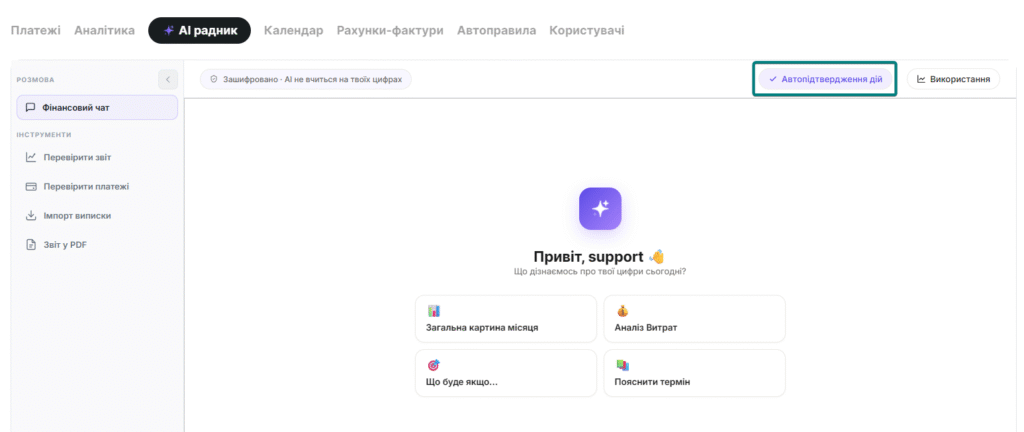
What can:
- Has several ready-made templates (Quick Prompts) for the most common scenarios
- When enabling the “Auto-confirm actions” functionality – edits payments at your request
- Analyzes the current report data: if Cash Flow is open – analyzes the movement of money; if P&L – focuses on income and profit
- Responds by default for the current month – but just specify in the request, and it will switch to any other period
- Supports voice input in 17 languages: dictate the request – the text appears in the field, edit and send
Quick Prompts — several ready-made scripts:
| Template | What analyzes |
| 📊 The big picture | How much came, went, what’s left, what’s unusual |
| 💰 Where does the money go? | TOP 5 expense categories + comparison with last month |
| 📈 Cash Flow Forecast | 3 Months Ahead Forecast, Cash Breakeven Points |
| 🩺 Financial checkup | 5 indicators with status: good / monitor / act |
| 📋 Tax issue | General consultation with a disclaimer about the accountant |
| Tip: The template inserts text into the input field — but does not automatically send it. You can complete the request before sending. |
ㅤㅤㅤ
Check the report✅
Analyzes entire layers of data (Cash Flow or P&L) for a selected period (up to 1 month) and finds structural changes that are difficult to notice manually.
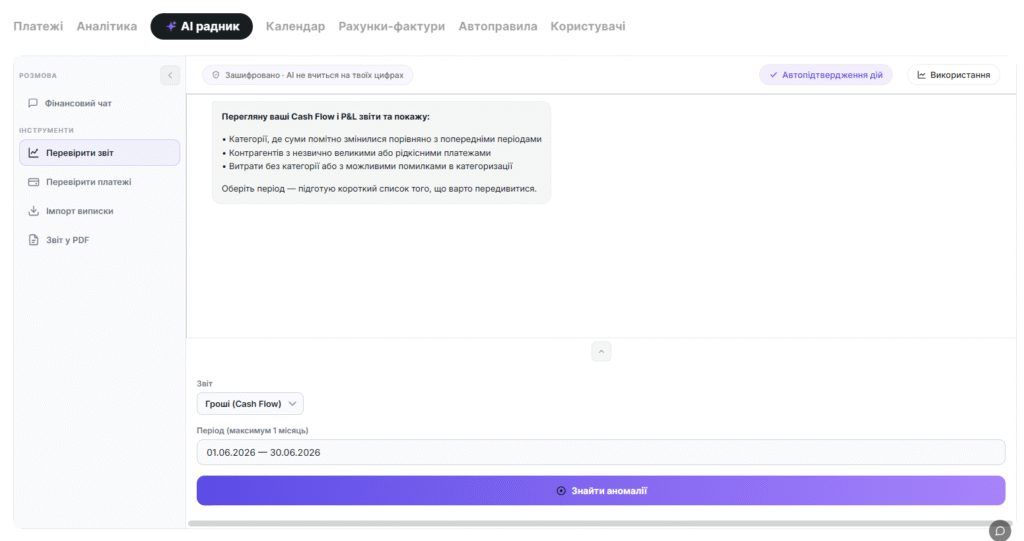
What he is looking for:
- Unconfirmed Spend (categories with low % of confirmed transactions)
- Anomalous Growth: Category has grown 3+ times compared to the previous month
- Structural Changes: Key Category has suddenly ‘disappeared’ or become insignificant
- Suspicious Account Balances Outside of Normal Range
How to use:
Once the results are available, the form can be collapsed to examine each anomaly in detail.
- Open an agent
- Choose a report type: Cash Flow or P&L
- Choose a period (up to 1 month)
- Click “Find anomalies”
ㅤㅤㅤ
Check payments✅
It works at the level of a specific bank account or cash register. Indispensable when you need to find a specific error in the flow of operations.
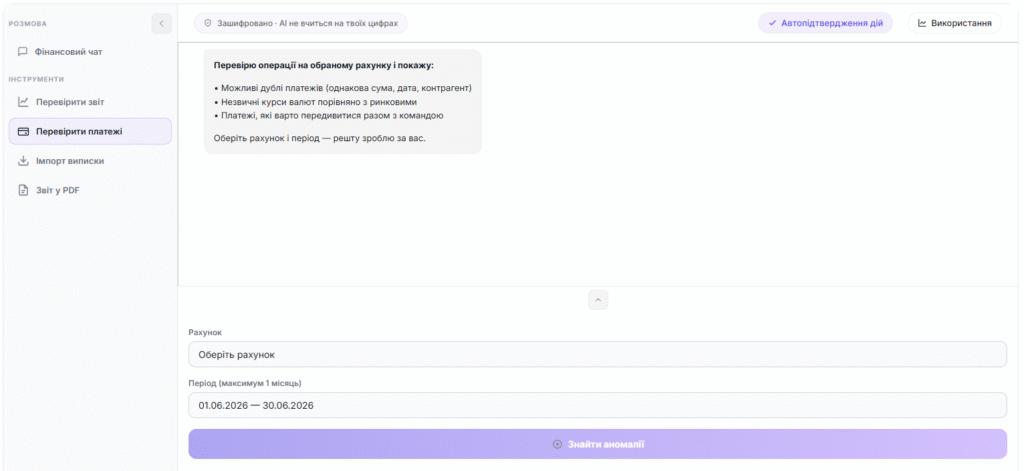
What he is looking for:
- Duplicates: two identical payments with a small interval
- Anomalous rates: for example, a transaction at the rate of 50.85 UAH/EUR with a median of 80.31 (deviation 37%+)
- Transactions that fall out of the typical pattern for this account
Convenient detail:
It keeps not only the date but also the account name in the history. A week later you will remember exactly where the error was found.
ㅤㅤㅤ
AI statement import ✅
Forget about setting up formats for each bank. The agent uses AI to “see” the structure of any document.
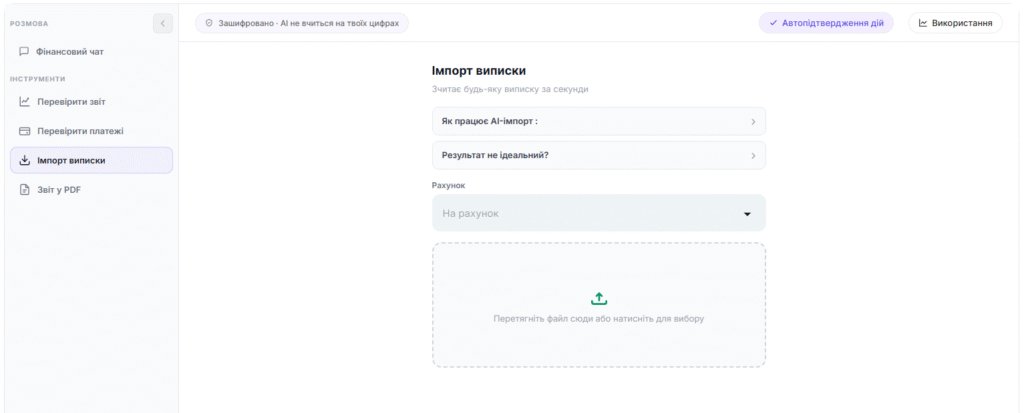
Supported formats:
- PDF statements from any bank
- Excel / CSV with non-standard structure
- Photo or scan of a paper check
- Text files with data
How it works:
- Select an account to import
- Click “Import” – transactions will be added to the Journal
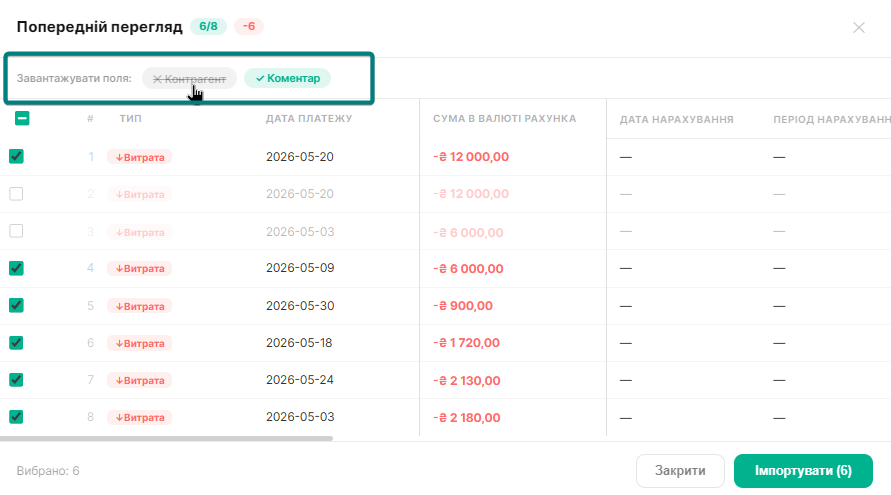
- AI will recognize transactions – a preview table will open
- Check and mark what to import
- Click “Import” – transactions will be added to the Journal
ㅤㅤㅤ
Additionally, in the “Preview” you have the option to remove the automatic addition of a counterparty or comment.
ㅤㅤㅤ
Get PDF Report ✅
Generates ready-made PDF reports with analytics, conclusions, and recommendations. Not just numbers — but a document for an investor or partner.
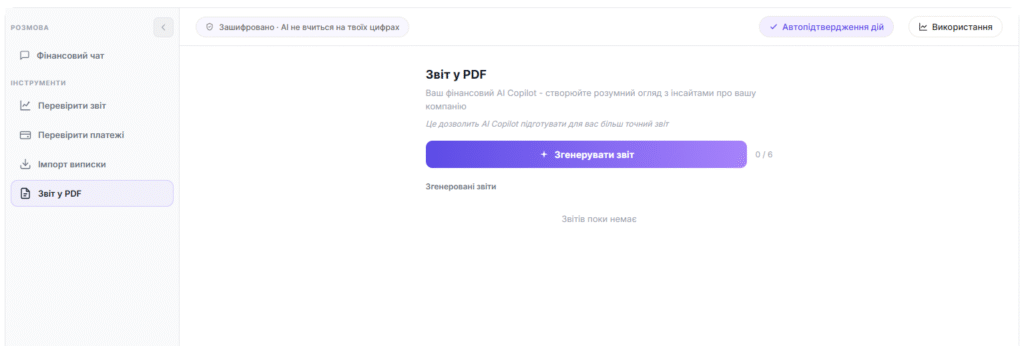
What is included in the report:
- Key Financial Indicators
- Charts and Visualization
- Conclusions on the Current State
- Specific Recommendations
The report is stored in the system and can be downloaded again at any time.
ㅤㅤㅤ
ㅤㅤㅤ
ㅤㅤ
2. Examples of requests for agents
ㅤㅤㅤ
Below are 7 basic scenarios for using the Financial Chat agent with ready-made prompts. You can copy and send them immediately.
ㅤㅤㅤ
01 – Overall picture of the month
🇬🇧 Give me an overview of this month — total income, total expenses, closing balance. Flag anything unusual.
→ Confirmed income and expenses, net flow, balance.
Anomalies – the agent will highlight them himself.
ㅤㅤㅤ
02 – Where does the money go?
🇬🇧 Show my biggest expense categories this month and compare with last month. Where did costs grow the most?
→ TOP-5 categories with amounts and share of the total. Comparison with the previous month. Anomalies — separately.
ㅤㅤㅤ
03 – Scenario planning
🇬🇧 Thinking of letting go 2 sales reps (~$2,200/month). What happens to revenue — and does the cost saving justify it?
→ 3 scenarios (optimistic / realistic / pessimistic) + one-sentence recommendation.
ㅤㅤㅤ
04 – Financial term
🇬🇧 What is gross margin and what is mine right now? Is it normal for my type of business?
→ Plain language definition + formula + your current value + industry benchmark.
ㅤㅤㅤ
05 – Cash Flow Forecast
🇬🇧 Forecast my cash flow for the next 3 months. Where might I hit a cash crunch and what should I do to prevent it?
→ Forecast balance by month, risk points, recommendation on what to do now.
ㅤㅤㅤ
06 – Financial checkup
🇬🇧 Do a financial health check for this month. What needs my attention right now?
→ 5 indicators with status: 🟢 good / 🟡 monitor / 🔴 act.
For each yellow and red — one specific action.
ㅤㅤㅤ
07 – Stress test
🇬🇧 What happens if my biggest client stops paying? How much time do I have and what do I need to do to survive?
→ Impact on runway and margin, critical point, time buffer, survival plan in steps.
| ✅ Works better “for October 2025” “5 people, ~180,000 UAH/month” “compare with last month” “what should I do with this” | ⚠️ Less accurate “show something” “how are you in general” “what do you think” “just show the expenses” |
ㅤㅤㅤ
3. Data security and privacy
Working with finances requires the highest level of trust. Here’s how we protect your information.
🔐 Isolation of companies
Each agent works in an isolated context. When you make a request, the system only transfers data to the current company. Even if you have several companies, the agent does not “see” data from company A while you are working in company B.
Any attempt to change the company ID via a request or URL is ignored — the system always takes it from your authorization session.
🔐 Read-only principle
Agents have access to data solely for analysis. They do not have the technical ability to:
- Create new payments or transactions
- Delete or edit transactions
- Change company, account or category settings
- Perform any actions on behalf of the user
ㅤㅤㅤ
*The exception is the AI-agent “Financial Chat”, for which you can separately enable the auto-confirmation function. After its activation, the agent will be able to perform changes (for example, edit or delete operations) only at your direct request.
The AI-agent does not perform any actions on its own, does not make changes without your request, and cannot initiate data editing on its own initiative. It performs only those actions that you explicitly ask it to perform.
🔐 Corporate contract
Finmap uses AI through an Enterprise agreement. This means specific guarantees that are not available in regular consumer products:
| 🚫 Without training on your data Your financial data is never used to train AI models. |
| 🗑️ Automatic log deletion Request logs are stored for only 30 days for technical monitoring, after which they are permanently deleted. |
| 📋 Data Processing Agreement (DPA) DPA with Standard Contractual Clauses (SCC) is automatically included in the Commercial Terms. By accepting the terms, you simultaneously accept the DPA. |
| 🔐 TLS 1.3 encryption at all levels: browser ↔ Finmap ↔ AI. Data is transmitted over a secure connection in accordance with the DPA with Standard Contractual Clauses. |
🔐 Protection against attacks
- Prompt injection: user request is wrapped in a separate context and cannot override system agent instructions
- Session protection: tokens have a TTL; if permissions are lost, the session ends immediately
- Rate limiting: rate counting is atomic — parallel requests cannot bypass the counter
ㅤㅤㅤ
ㅤㅤㅤ
ㅤㅤㅤ
4. FAQ
About agents
| 01 – How are AI agents different from regular chat? |
| AI agents are not just a chat, but a set of tools for specific tasks. Each agent is specialized: Financial chat – analyzes the business and answers questions Find anomalies – finds anomalies in reports Balance reconciliation – looks for errors in payments AI statement import – imports statements Get PDF report – generates PDF reports That is, you get not a “conversation”, but a specific result. |
| 02 – On what data does the agent base its answers? |
| Agents work only with your company’s data in Finmap: transactions, categories, accounts, reports (Cash Flow and P&L). If the data is not enough to answer, the agent will directly tell you what is missing and what to do. |
| 03 – Can AI answers be trusted? |
| AI helps analyze data and highlights what is important, but: it is not a replacement for an accountant or financial advisor; important decisions should be checked with specialists. Think of the agent as a tool for quick analysis and tips — not as a last resort. |
| 04 – What language can you communicate in? |
| In any supported language, the agent will respond in the same language. Supported languages include: Ukrainian, English, Polish, Czech, Hungarian, Romanian, Spanish, French, Italian, Turkish, Portuguese, and others. |
| 05 – How does voice input work? |
| 1. Click the microphone icon in the input field 2. Dictate your query 3. The text will automatically appear in the field 4. Edit if necessary and send – Convenient for quick queries “on the go” – Supports 17 languages. |
About Operations Management (*new)
| 01 – Can an AI agent create a new operation? |
| Yes. A Financial Chat agent can create transactions at your request. Simply describe what needs to be added — the agent will prepare the transaction and show a preview for confirmation. The action is performed only after your approval. |
| 02 – Can an AI agent edit an existing transaction? |
| Yes. The Financial Chat agent can change the data of existing transactions – amount, category, date, etc. Describe in the chat what exactly needs to be corrected, the agent will show the changes for confirmation and apply them only after your approval. |
| 03 – Can an AI agent delete a transaction? |
| Yes. The Financial Chat agent can delete transactions at your request. Before deleting, the agent will show you which transaction will be deleted and will perform the action only after your confirmation. |
About Financial Chat
| 01 – Why is the agent not analyzing the data I expected? |
| By default, the Financial Chat agent uses the current month and an open report (Cash Flow or P&L). To change, simply specify in the query: “for March 2025” “for the entire year 2024” “show by counterparties”. The agent will pick up the context automatically. |
| 02 – What if I don’t know what to ask? |
| Write something simple, for example: “how is my business doing.” The agent himself: will analyze the data, find important knowledge, and give specific recommendations Or click one of the ready-made templates (Quick Prompts) in the right panel. |
About Find Anomalies and Payment Anomalies
| What is different about Find Anomalies in Reports? | What is the difference between Anomalies in payments? |
|---|---|
| Analyzes reports (Cash Flow / P&L) The big picture: what’s wrong with finances | Analyzes a specific account / cash register Details: where the error in the transactions |
About AI statement import and Get PDF report
| 01 – What files can be imported via AI statement import? |
| Almost any: PDF, Excel/CSV, photos or scans of checks, text files. AI will recognize the structure and show a preview before importing. |
| 02 – Can I edit data before importing via AI statement import? |
| Yes. Before loading, a table with recognized operations opens – you can review them and choose what to import. |
| 03 – What is included in PDF reports Get a PDF report? |
| The report contains: key financial indicators, graphs and visualizations, conclusions on the current state of the business, specific recommendations. This is a ready-made document that can be shown to an investor or partner. |
About safety and limits
| 01 – Is it safe to use AI agents? |
| Yes. Basic principles of protection: – Access only to the data of the current company — isolation between companies at the Read-only technical level: agents cannot change or delete data. – Data is not used to train models. – Request logs are automatically deleted after 30 days. – TLS 1.3 encryption at all levels. |
| 02 – Do other users see my requests to AI? |
| No. Request history is stored separately for each user. Навіть якщо колеги мають доступ до тієї ж компанії — вони не бачать вашу переписку з агентами. |
| 03 – Why can’t I complete the request? |
| Possible reasons: Request limit exceeded → error 429. Agent is not available in your plan. Required parameters are not selected (for example, account in Payment Anomaly). Check the Usage panel or contact support to extend the limits. |
| 04 – Are there limits on the use of agents? |
| Yes, each plan has daily and monthly limits on the number of requests. The Usage panel (right column in the agent interface) shows the current status: – Green indicator – up to 70% used – Yellow indicator – more than 70% used – VIP plans have an unlimited number of requests (∞). |
| 05 – Why does the interface look different on my phone? |
| In the mobile version, some elements are hidden to make room for the chat and analysis results. In particular, the limits panel and the Payment anomalies button are not displayed in the log on mobile. This is expected behavior – for full functionality, use the desktop version. |
| 06 – Can AI be used for tax matters? |
| You can get general information and guidelines, but: This is not official tax advice. For specific solutions, please contact an accountant in your jurisdiction. Financial Chat always accompanies answers to tax questions with an appropriate disclaimer. |
ㅤㅤㅤ
❓ Have a question? Write to support or ask an agent Financial chat directly in Finmap 💬
ㅤㅤㅤ