


Contents
How to synchronise planned transactions and incoming data from the bank?
Sometimes you may create a planned transaction, but the payment gets deposited into your integrated account. As a result, you will have two transactions: the manually planned one and the actual integrated transaction.
Finmap offers a simple solution - a function for recognising and merging actual and planned transactions.
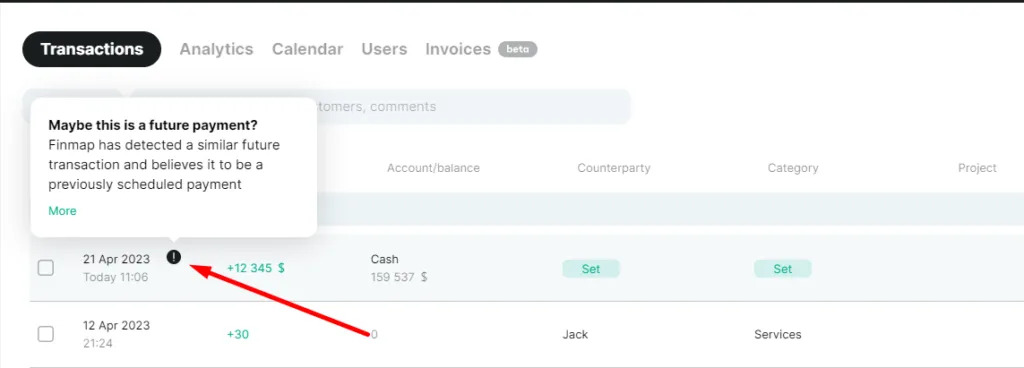
Next to the actual and planned transactions, the service will display a prompt "!" for merging these two payments:
Click "Details" to view all payments that meet the merging conditions, and select the correct one by marking it and clicking "Repay":
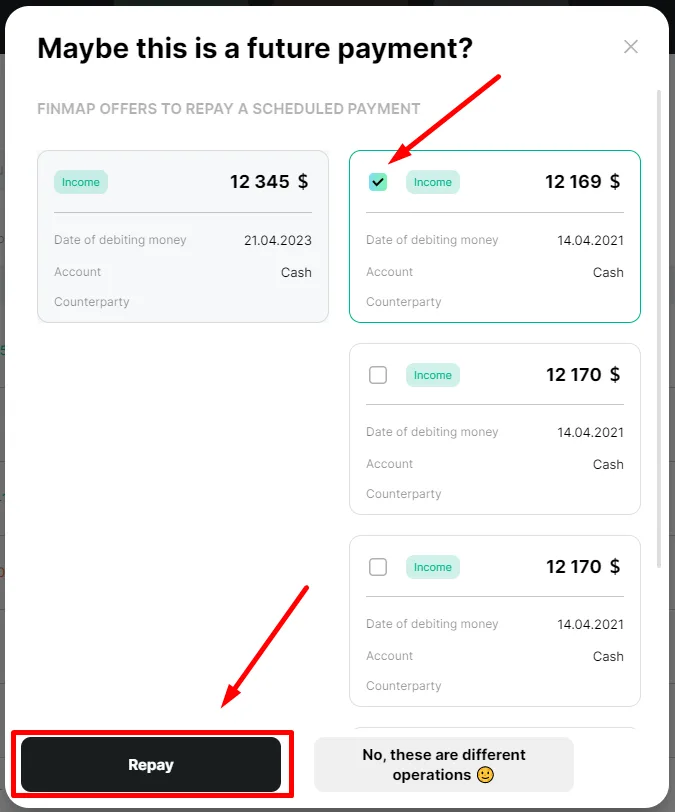
After these steps, the service will manage the transaction into the actual one.
Conditions under which Finmap identifies that the actual transaction corresponds to the future one
- The difference between the sums of the two transactions is less than or equal to 2.5%
- The difference between the dates of the two transactions is less than or equal to 7 days
- The transactions specify the accounts
- You don't change the data in planned transactions after receiving the actual one.