


Contents
Instruction for Warehouse Accounting in Finmap
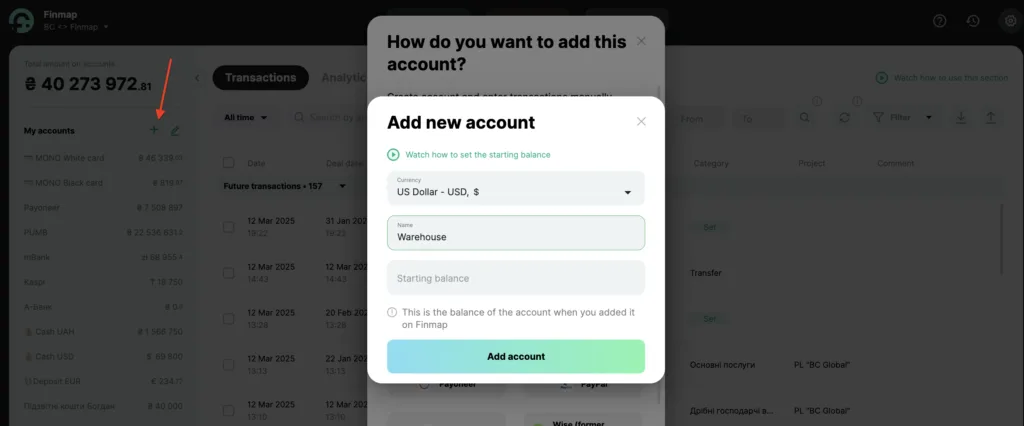
Finmap is a tool that allows you to manage finances, but if you need to manage warehouse accounting on a very small scale within a single program, this guide will help you understand where and how to display the warehouse in Finmap. 1️⃣ Create a "Warehouse" account My accounts → Add account →
1️⃣ Create a "Warehouse" account
My accounts → Add account → Create account
This account will track inventory balances in monetary terms.
2️⃣ Create categories for warehouse operations
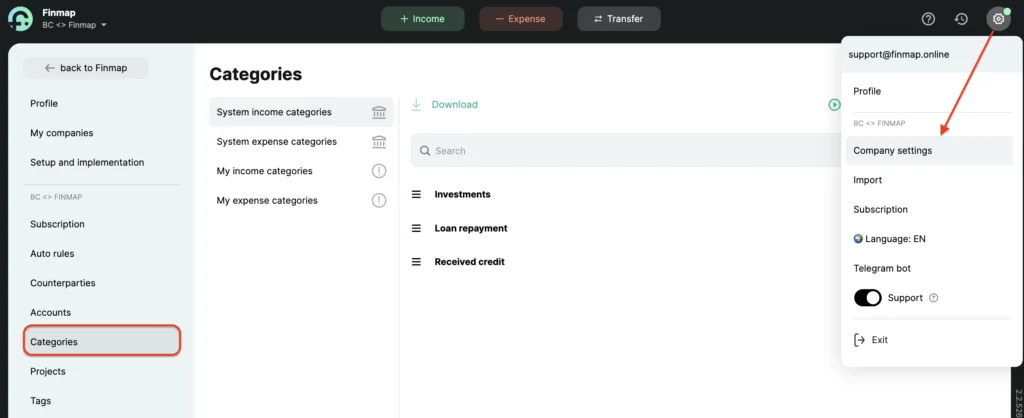
Expense categories:
- Product purchase – payment for purchased goods from a bank account.
- Cost write-off – an expense transaction from the "Warehouse" when selling goods.
Income categories:
- Sales revenue – funds received from a customer for goods.
- Warehouse replenishment – adding goods to the warehouse in monetary terms.
🔄 Operation cycle "from purchase to sale"
1️⃣ Purchasing goods for the warehouse
- Type: Expense
- Category: "Product purchase"
- Tag: "Cost price" (to exclude the transaction from certain reports)
2️⃣ Receiving goods in the warehouse
- Type: Income
- Account: "Warehouse"
- Category: "Warehouse replenishment"
This reflects that the purchased materials (goods) are now in stock.
3️⃣ Writing off goods from the warehouse
- Type: Expense
- Account: "Warehouse"
- Category: "Cost write-off"
- Amount: At the purchase price of the goods
Records the cost of materials used in production or sales.
4️⃣ Receiving payment from a customer
- Type: Income
- Category: "Sales revenue" (or another relevant category)
- Amount: Full sale price
This transaction records the income received from customers.
📊 Filtering transactions in reports
To get accurate financial data, certain transactions need to be excluded.
1. "Money" report
Exclude:
- Step 2 – "Warehouse replenishment"
- Step 3 – "Cost write-off"
Goal: Show only actual expenses for purchasing goods and income from customers.
2. "Profit" report
Exclude:
- Step 1 – "Product purchase"
- Step 2 – "Warehouse replenishment"
Goal: Show only written-off cost price and customer revenue (the difference is your profit).
📌 Tip: Both filters can be saved and used when needed.