


Contents
API 2.2 General information
API (Application Programming Interface) — is a set of ready-made classes, procedures, functions, structures, and constants provided by an application (library, service) for use in external software…
General information
API (Application Programming Interface) — is a set of ready-made classes, procedures, functions, structures, and constants provided by an application (library, service) for use in external software products. The API acts as an intermediary between the application developer and any environment with which the application must interact.
Finmap has an open API that can be used by users for their own needs and to customize individual integrations with the service. You can view information on the API in the section Settings - Company settings, block - Developers. Here you will find information about the API documentation.
📎 Or you can find it here: https://api.finmap.online/
💡 If your goal is to connect Finmap to an AI assistant (Claude, ChatGPT, etc.) rather than build your own integration, use MCP: Connecting Finmap to an AI Assistant (MCP).
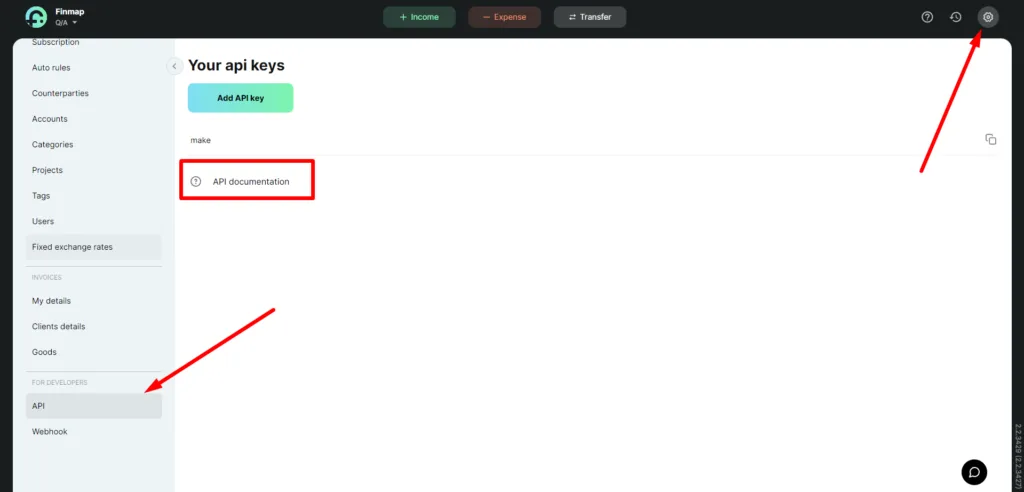
The API key is an encryption key for user authentication in the system, similar to a login and password.
Finmap API documentation is based on the Swagger resource
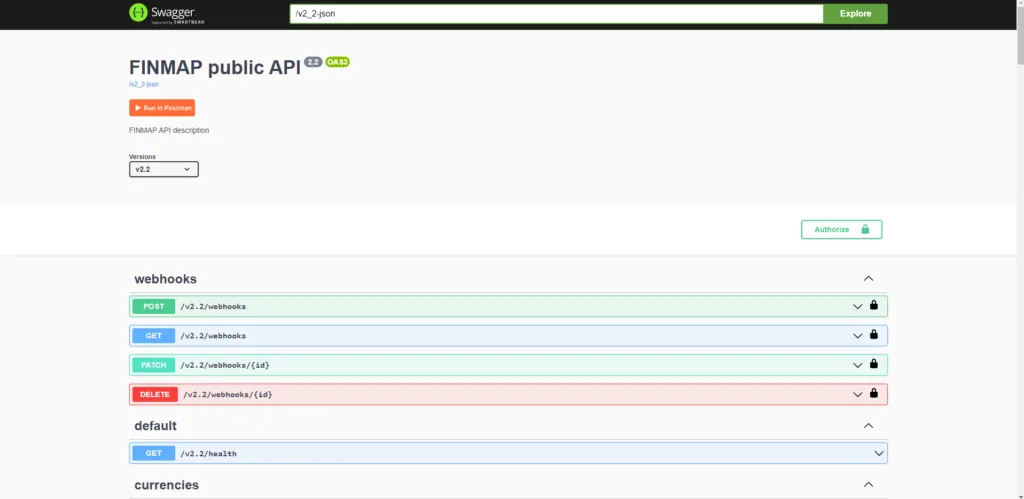
Blocks in API documentation 📁
The documentation is divided into blocks:
- webhooks - a block that helps to work with webhooks
- default - general functionality check
- currencies - shows in which currency you can open a company
- accounts - work with accounts
- tags - work with tags
- projects - work with projects
- categories/income - work with income categories
- categories/expense - work with expense categories
- customers - work with clients
- investors - work with investors
- creditors - work with creditors
- debitors - work with borrowers
- suppliers - work with suppliers
- employees - work with employees
- owners - work with owners
- operations/income - work with revenue transactions
- operations/expense - work with expense transactions
- operations/transfer - work with transfers
For certain blocks, you can view, edit, delete, and add. These blocks include:
- tags
- projects
- categories/income
- categories/expense
- customers
- investors
- creditors
- debitors
- suppliers
- employees
- owners
Through the following blocks, you can only add operations. They include:
- operations/income
- operations/expense
- operations/transfer
❌ The exception is the accounts block; through this block, you can only receive information about which accounts are in the service
Query methods
- GET — used to get or read data. Requests using this method can only retrieve data.
- PATCH — is usually used to update a resource by replacing the request data.
- POST — is usually used to create a new resource, and no one will see this information after you send it.
- DELETE — deletes data.
Request limits
Shared limits apply to all API methods per company:
- 10 requests per 5 seconds
- 120 requests per minute
- 10,000 requests per day
Previously the limit applied only to the operations journal — now the limits are unified across all API methods.
How to tell you're approaching the limit. Every API response includes two headers:
- Remaining-Req-Count — how many requests are still available in the current window;
- Next-Possibility-At — the time when the next request can be sent, if the limit has been reached.
How to avoid hitting the limit:
- Instead of continuously polling the API, set up webhooks — Finmap will notify you about changes, so extra requests aren't needed.
- Export data in batches by period (for example, all operations for a day in one request) rather than making a separate request for each operation.
If your integration genuinely needs more throughput, from 27.08.2026 an add-on of +100 requests/min is available: $10/month, $60 for 6 months, or $120 per year.
If you have any questions
If you have any questions about the API documentation or have an example of a technical request that you would like to resolve, please write to us at support-team@finmap.online.
The letter should describe the following: "The request … does not work (this response appears) when you send the parameters …". Our technical specialist will review your request (requests are processed within 24 hours) and provide a qualified response.