


Contents
Category suggestions after connecting a bank or importing
After you connect a bank or import a statement, Finmap suggests categories for operations without a category, and you apply them with one click.
When you connect a bank integration or import a statement for the first time, operations arrive in Finmap without categories. That is normal: categories are the structure of your company, which you build yourself using different entities. To save you time, Finmap can suggest grouping similar payments and adding a category for them. For example, if several operations say “Account maintenance fee”, Finmap will suggest combining them into one group and assigning them one category.
How it works
Finmap chooses a category for each group like this:
By typical bank comments — for example, bank fees, tax payments and similar.
By categories you have already created. If you have already assigned a category to similar operations, Finmap suggests the same one.
With the help of an AI model, if none of the options above fit. The model reads the payment purpose and picks a category from those in your company. If there is no suitable one, it suggests creating a new one.
Nothing changes without your consent. A suggestion is only a proposal.
How to get suggestions
Suggestions appear after you connect a bank for the first time or import a statement.
Connecting a bank
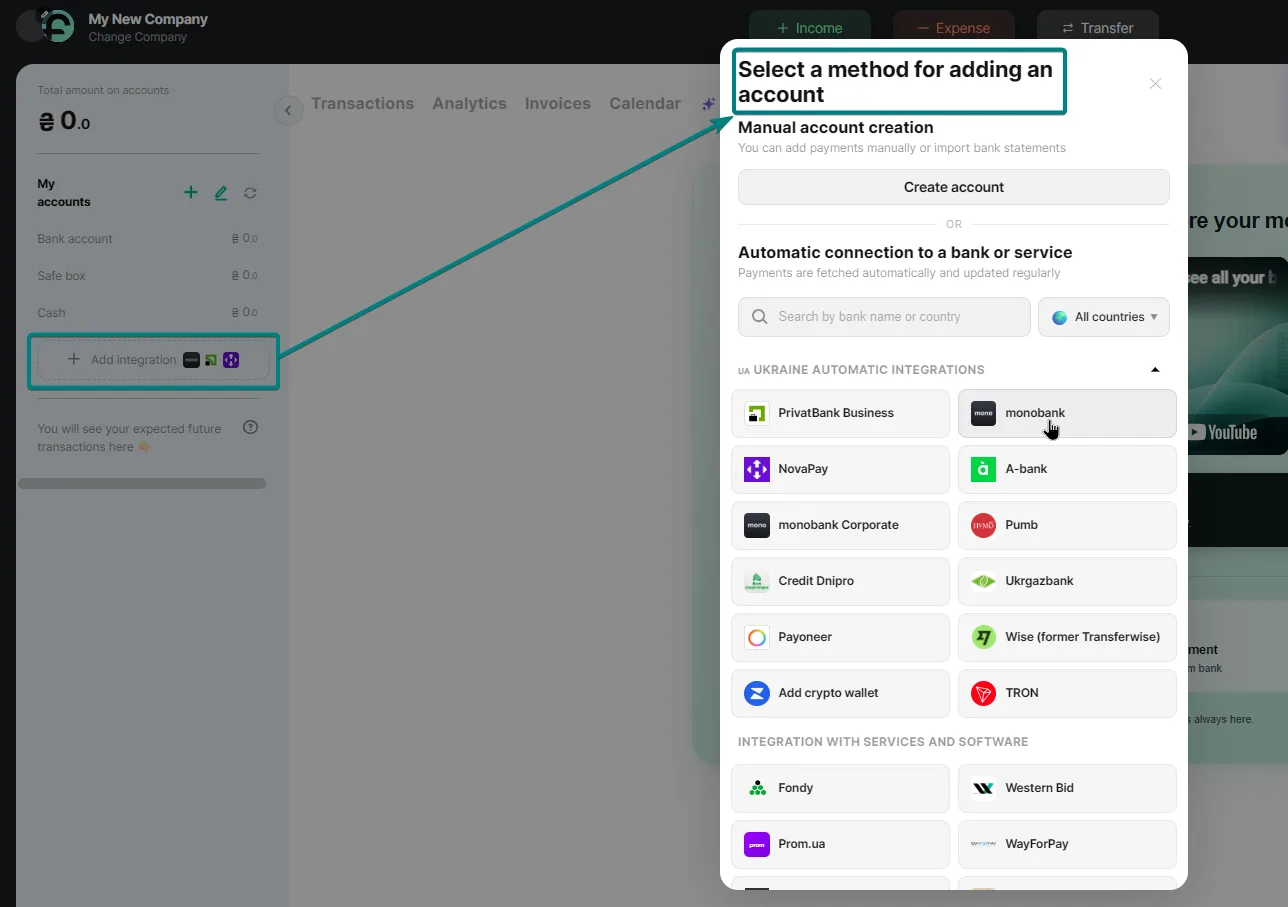
Connect an integration with the “Add integration” button, for example, monobank, and complete the connection step by step. Wait for the data to load. After connecting your bank, wait 5–10 minutes, and you will see a message with prompts.
Importing a statement
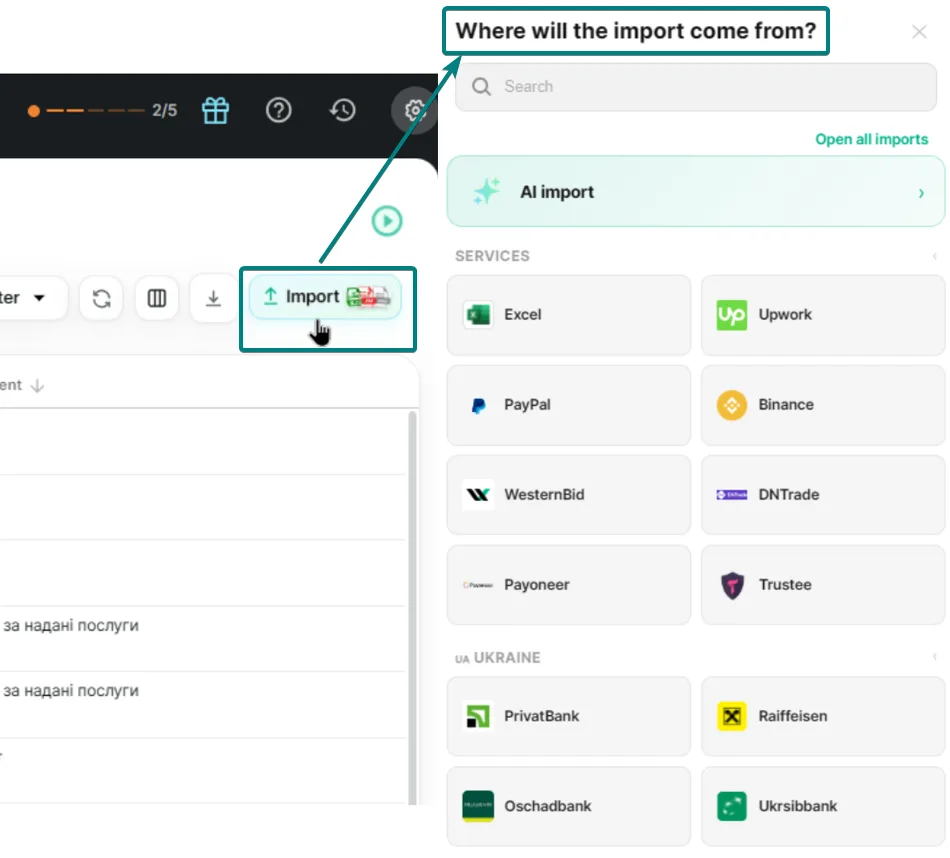
You can also upload a statement via import: with a template or with AI import. Suggestions will appear 2–6 minutes after the import finishes.
What you will see
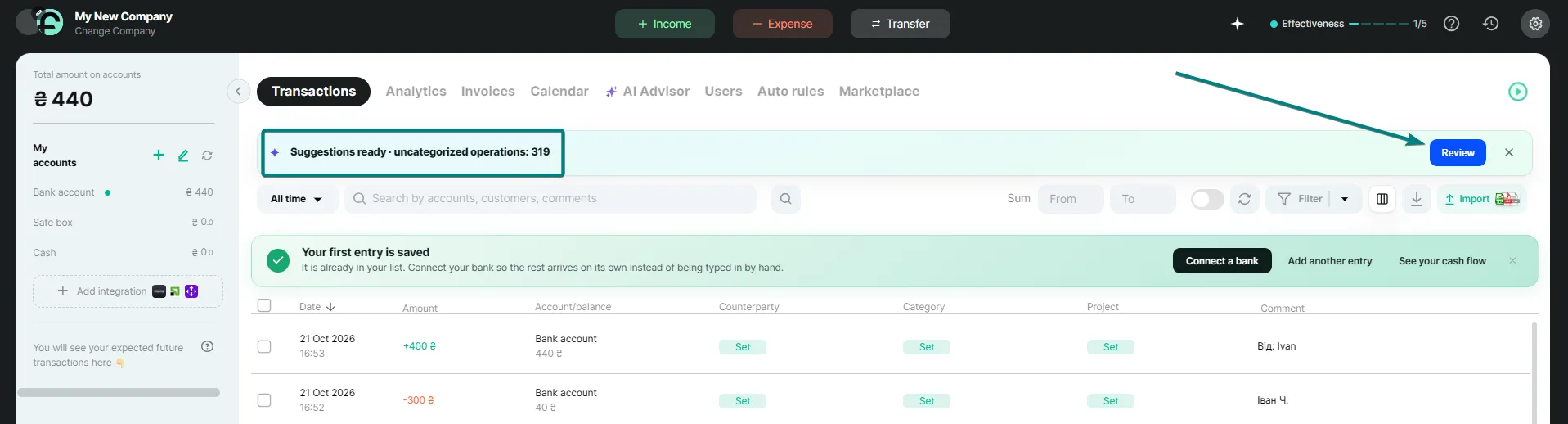
In the Transactions section, above the list of operations, a message will appear saying the suggestions are ready. Click “Review”.
The “Suggestions” window
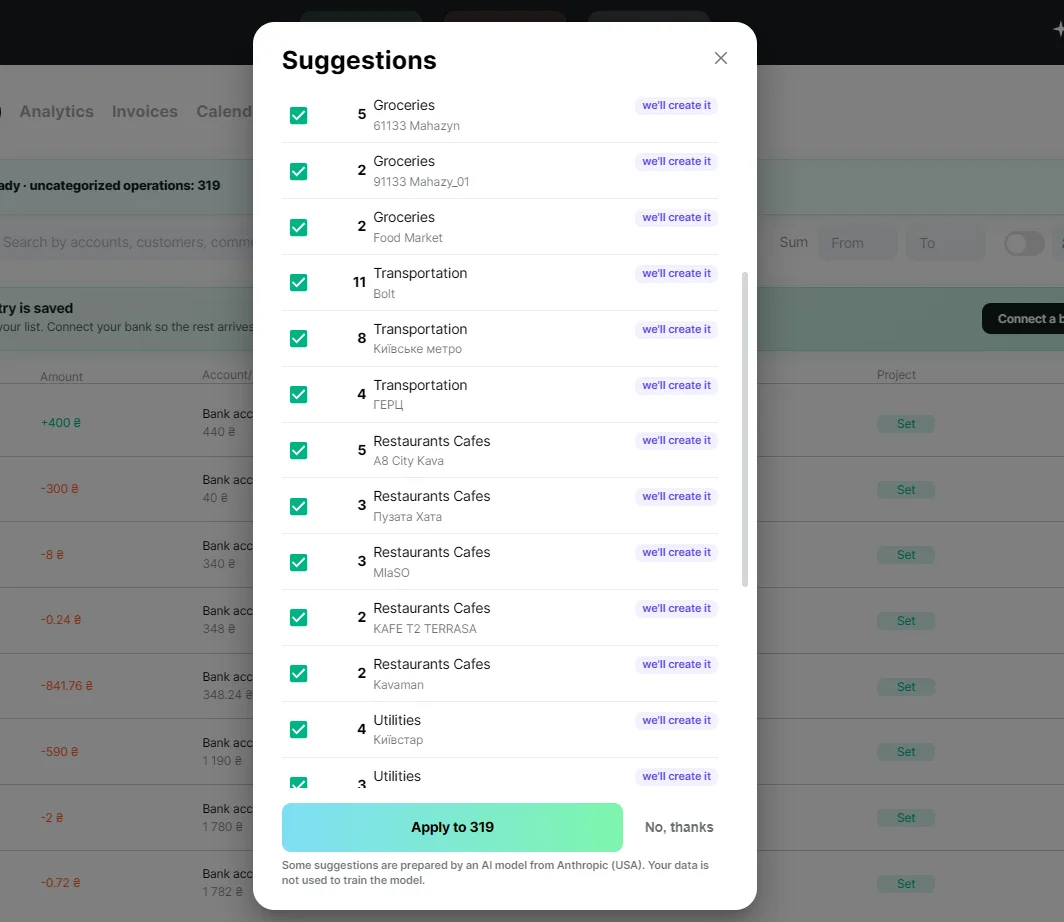
In the window you will see groups of operations and the category Finmap suggests for each. The label “you already have it” means such a category already exists in your company, and “we will create it” means Finmap will create it after your consent. Uncheck the groups that don't suit you and click “Apply”. If you don't need the suggestions, click “No, thanks”. New category names will be in the language selected in the profile of the user who connected the bank or ran the import.
The text in the message tells you what is happening:
“Suggestions ready” — you can review them and choose what to apply.
“Applying suggestions” — Finmap is assigning categories. You can close the tab, the process will continue on its own.
“Done” — categories have been assigned.
“Could not apply part of them” — to roll back the part that was applied, click “Undo applied”.
If the result does not suit you, click “Undo” in the message: operations will return without a category. You can do this within 7 days, as long as you haven't closed the message with the cross. Operations you have already changed yourself are not affected by the undo. Later, you can change a category directly in the transaction, and in the action history, operations changed by a suggestion are marked with a purple AI star.
What suggestions do not do
They change only the category of an operation: the amount, date, account and comment stay as they were.
They do not touch operations where an auto-rule worked.
They do not assign system categories (for example, VAT, loans): you assign them yourself, as before.
They work only for the first bank connection and for each import, not for new operations that arrive daily.
They do not work for imports from a backup restore.
They do not use the AI Advisor limits.
Who sees suggestions
The owner and users with full access. Users with “view only” access do not see the message.
Each bank or import gets its own suggestion. If there are several, they are shown one by one: the next appears as soon as you finish with the previous one.
A bank connected before the feature was enabled for your company will not get a suggestion. It will work the next time you connect or import.
Frequently asked questions
Where does my data go?
For groups that could not be identified by templates and your previous operations, a few examples of the payment purpose are processed by the Anthropic AI model (USA) — the same partner that works in the AI Advisor. The data is not used to train the model.
I applied the suggestions and the wrong categories were set
Click “Undo” in the message above the list of transactions: this works for 7 days while the message has not been closed. If it is already closed, change the category in the transaction the usual way.
Why am I not getting any suggestions?
Check whether it is one of these cases:
The feature is not yet enabled for your company, or the bank was connected before it was enabled.
You have “view only” access.
The operations already have categories, or an auto-rule worked on them.
None of your categories fits.
You closed the message with the cross (it will return in a day) or clicked “Not needed”.
Less than 6 minutes have passed since the import, or the import was undone or deleted.
New categories were created in the wrong language
The name is taken from the language selected in the profile of the user who connected the bank or ran the import. You can rename a category in the Categories section of company settings.
The message keeps saying “Applying suggestions” for a long time
With large volumes this can take several minutes. You can close the tab, the process will continue on its own. If nothing changes for more than 30 minutes, contact support.
Short on time to figure it out yourself? Finmap financial experts will help you set up categories for your business. Go to Settings → Finance Expert Help and book a consultation.