


Contents
How to record refunds in Finmap
Merge an expense and its refund on the same account, and your reports will show the real amounts.
Sometimes you pay a supplier and they refund part of the money. Or a client pays you ₴36,000, and later you refund them ₴35,000. Two transactions appear on the account: an expense and an income. The Cash Flow and Profit reports count both, so your income and expenses look bigger than they really are.
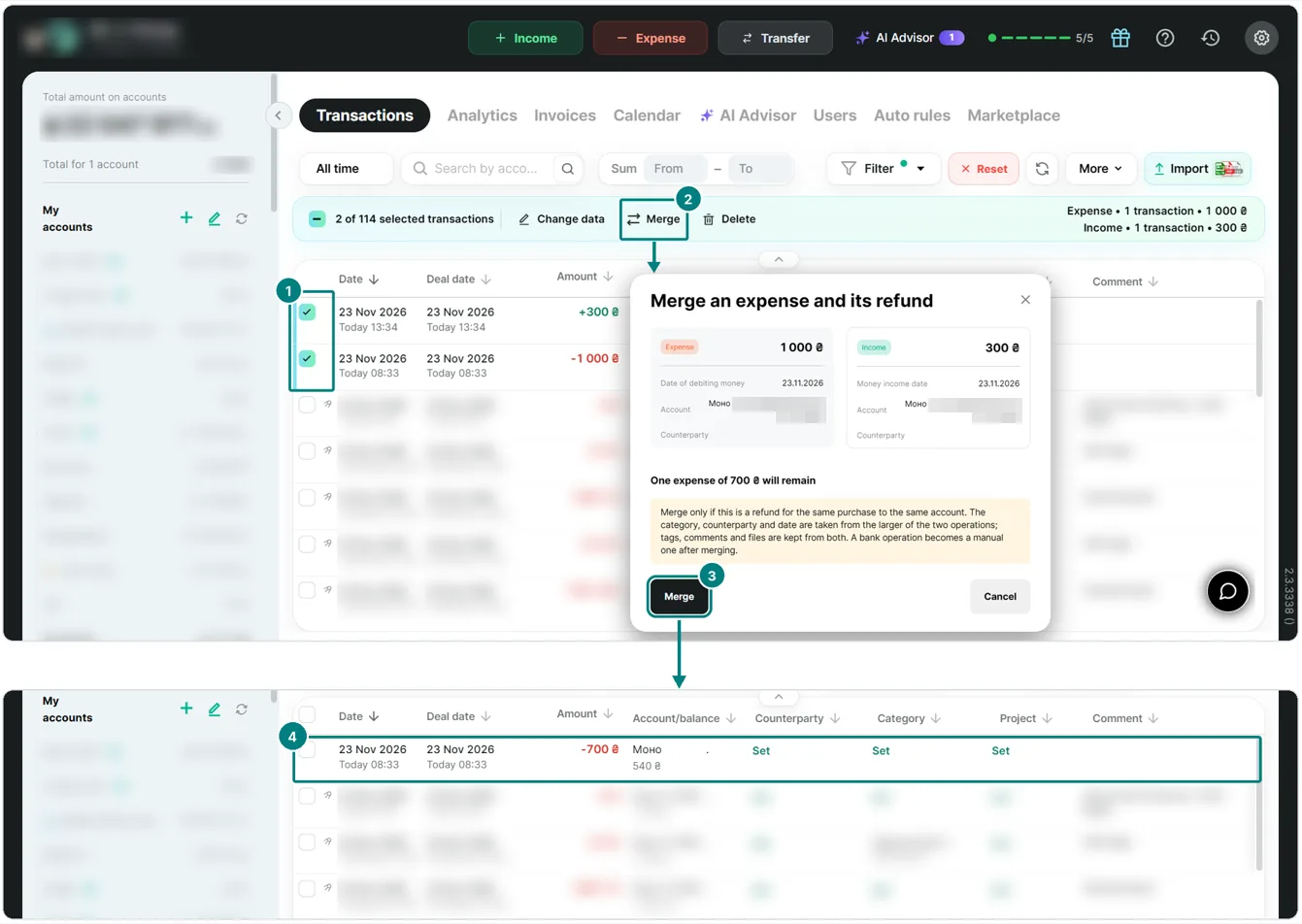
Finmap lets you merge an expense and its refund: two transactions on the same account become one, for the amount of the difference.
What you get after merging
Expense ₴1,000 − refund ₴300
One expense of ₴700
Income ₴36,000 − refund ₴35,000
One income of ₴1,000
Equal amounts
Both transactions are deleted, because the money was refunded in full
Account balance
Stays the same
The category, counterparty and date are taken from the larger transaction; tags, comments and files are kept from both.
How to merge an expense and its refund
- Open Transactions.
- Tick the expense and the refund.
- In the green bar above the list, click Merge.
- In the window, check which transaction will remain and confirm: Merge or, if the amounts are equal, Delete both.
When the Merge button is available
Can be mergedOne expense and one income on the same account that have already happened. Bank transactions too: they won't be imported again.
Can't be mergedPlanned and recurring transactions, as well as an expense and an income on different accounts.
If the expense and the income are on different accounts, it's a transfer between your accounts. Use the Combine into transfer button for that. Learn more in How to combine Income and Expense in a Transfer.
How to undo a merge
- Open Analytics → Action History.
- Find three entries: the deleted expense, the deleted income and the created transaction for the difference.
- Tick them and click Undo actions.
Both transactions will come back, and the transaction for the difference will disappear. Learn more in Action History in Finmap.
FAQ
I don't see the Merge button
Make sure you've selected exactly one expense and one income, both on the same account and both already happened, i.e. not planned or recurring. If the accounts are different, you'll see the Combine into transfer button instead.
Can I merge transactions imported from the bank?
Yes. After merging they won't be imported again.
I merged the wrong transactions
Undo the merge in Analytics → Action History: tick the three entries and click Undo actions. Both transactions will come back.
Merge refunds, and your Cash Flow and Profit reports will show your business's real income and expenses.